Screen Cast Connect: TV Mirror brings Android screens to big displays
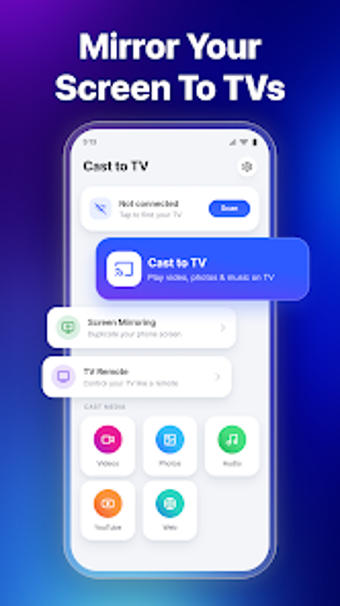
Screen Cast Connect: TV Mirror, from Tada Corp, mirrors Android screens to smart televisions for presentations, media sharing, and mobile gaming. The app sends a phone's display in real time with low-latency mirroring and supports casting of local videos, photos, and music. It also targets household and professional users who want to show mobile content on a TV without extra hardware, offering a compact workflow for large-screen viewing.
What does Screen Cast Connect actually do on a device?
The app captures the Android display and projects it to a television using wireless casting protocols; this includes casting local videos, high-resolution photos, and music files. It also embeds a web browser so users can navigate to online videos and stream them to the TV. These functions are grouped into full-screen mirroring plus dedicated media casting modes, so the tool can operate as either a straight mirror or a media caster depending on the user's intent.
Does mirroring depend on local network conditions?
Yes, the app's performance is tied to local network throughput because connections use standard wireless protocols. The product description highlights low-latency, real-time mirroring, which means perceived lag is minimized when the network is stable. Expect performance to follow network quality rather than heavy on-device processing, since casting relies on the home network to transmit video and audio from the phone to the receiving device.
Is it safe to use on a shared home network?
The app discovers devices with one-tap device discovery and connects over local network protocols. That discovery model speeds pairing, but it also means connections occur within the same network space; users should prefer trusted home networks when mirroring. The app's compatibility with multiple casting standards implies it negotiates with the receiving device rather than routing through third-party cloud services.
Can non-technical users set it up and operate it reliably?
The setup is presented as a simplified three-step process and the interface includes on-screen playback controls plus a slideshow mode for photos, which lowers the learning curve for casual users. Families and presenters can start casting without deep configuration, while more technical users can choose different receiving devices. The presence of protocol support and basic controls gives both quick access and enough options for common scenarios.
A practical choice for local mirroring with few surprises
Recognized for a straightforward interface and reliable connection stability, the app is a practical option for Android users who need simple wireless mirroring and media casting on a TV. It requires both devices to be on the same local Wi-Fi network, which limits use to local setups rather than remote casting. Recommended.